 Tantra
The 11-step SaaS launch playbook
You don't need a big audience to launch. You need a wedge, a form, and a founder who answers every signup by hand. Here are the 11 steps, in order, and what the Tantra Launch funnel does at each one.
Every step shows Ledgerline, a made up finance software company, launching Ledgerline Close: the posts, emails, forms and Tantra screens, exactly as you would build them.
Position
Pick the one thing you win on, price it so nobody has to think, and get your ideal users invested before day one.
Steps 01 to 03Pick the one thing nobody else gives away
Your competitors have five years of features. You have eight months of nights and weekends. You will not win a feature checklist.
The play
- Find the feature you built better than anyone, the one people already ask to license or copy.
- Give it to every user, free, as early as you can ship it. No tier gate. It is your reason to switch.
- Add one counter position against the market leader: the fee, limit or friction they charge you for and you don't.
- Prove it within days. Post the first customer result the moment it lands.
Buyers don't switch for parity. They switch for the one thing they can't get anywhere else, and they switch faster when it costs nothing extra. A counter position gives them a one sentence reason to leave the market leader, and an early customer result proves your wedge is real before anyone asks.
Do it in Tantra
- Open Funnels, click New funnel, filter by Product launch and pick a template (Lifetime Deal Launch suits a SaaS beta). Click Build this funnel.
- Name it (Ledgerline Close launch) and choose Make a new pipeline for this funnel.
- In Tell us, answer with your wedge sentence, your counter position and your proof target. Stuck? Click Put our example answer in, to edit.
- Click Write my pages. Every page is drafted from those answers.
- Reopen the funnel's Brief button whenever you write a post, so every asset uses the same sentence.
- Want a rewrite? Ask in Chat: "Rewrite every headline in Ledgerline Close launch around the 4 day close."
See it: the Ledgerline example
Ledgerline Close launch
Close the books in 4 days with auto reconciliation on every account, included on every plan.
No per entity fees. Other close tools charge for every extra company you add.
3 beta teams closing in 5 days or less before launch day.
Launch page heroLaunch postsApplication formWelcome email
One price. Zero math.
If a buyer needs sliders, toggles and a calculator to read your pricing page, you lost them before the demo.
The play
- Launch with one paid plan. Every premium feature included, usage unlimited or generous.
- Show the price as one number on the launch page, the form and the welcome email.
- Name the contrast: incumbents price by contacts, sends, seats and add ons. You don't.
- Add tiers later, when real usage tells you where the lines are.
Every slider on a pricing page is a question the buyer has to answer before they can say yes. A single all in price removes the question, makes your launch post one line shorter, and turns your competitors' complexity into your contrast.
Do it in Tantra
- In the New funnel wizard, click Add a plan: Name, Price ($149), What it includes, and Button goes to checkout.
- Set the plan's checkout to Stripe Payment Link, Dodo Payments or Razorpay.
- Open Pages and elements, click Edit page on the launch page and keep one price block. Delete any tier table.
- Watch Measurement › Plans and checkout every week for visit to checkout.
See it: the Ledgerline example
Everything included. Unlimited entities, accounts and seats.
- Auto reconciliation
- Close checklist and sign offs
- Audit trail
- Every integration
Put your ideal users on your side of the table
Chasing tier one investors gets you a logo on a deck. It does not get you a single user.
The play
- List the 20 people whose usage would sell your product: big audiences, respected operators, loud fans.
- Raising? Ask them for small checks. Not raising? Offer founding partner seats with a real stake: locked pricing, roadmap input, public credit.
- Migrate them first, by hand, within a week of saying yes.
- Turn each migration into a case study with hard numbers, posted by you and tagged to them.
People with a stake in your success move fastest. Once your ideal users are invested, with money or with a founding seat, the easiest way for them to help is to use the product. Every migration becomes credibility you can show and a case study you can post with real numbers.
Do it in Tantra
- In Deals, create a pipeline called Founding partners with stages Invited, Committed, Migrated, Case study live.
- Add your 20 ideal users as deals in Invited. Move them as they say yes.
- In Automation, create a sequence with trigger Enters stage: Migrated: a Task step ("Collect numbers and a quote") and an Email step asking for the quote.
- When the numbers land, write the case study post in Content › Publish and schedule it for launch week.
See it: the Ledgerline example

• 6 entities, 2,140 accounts
• 97% reconciled automatically
• 0 spreadsheets on close day
Thank you Sam and the Oakridge team for trusting us first. 🙏
Announce
One post, one application form, and a founder who approves and greets every single user.
Steps 04 to 06Announce once. Make every line earn the click.
Most launch posts read like a changelog. Nobody applies to a changelog.
The play
- Before the post: spend the build months engaging online with the exact people you want as customers, so the announcement lands on warm ground.
- Line 1, the effort: what you built and how long it took.
- Line 2, real scarcity: you onboard a fixed number of teams a week because the founder approves each one (step 06 makes this true).
- Line 3, credibility: who built it and what they built before.
- Lines 4 to 8: the wedge, the counter position, three value props, the vision, then one link to the application.
- Post on X and LinkedIn from the founder account, same day, same link.
A launch post has one job: get the right people to apply. Effort earns attention, honest scarcity earns urgency, credibility earns trust, and the wedge earns the click. Post to people you have already engaged with and the first replies come from people who know you.
Do it in Tantra
- In your funnel, open Pages and elements › Edit page on the launch page. Headline = your wedge. Add the honest cohort cap. Publish.
- Put it on your domain: Funnels › Domains › Add a domain (go.ledgerline.com) › Add the records for me.
- Make one tracked link per channel in Funnels › Revenue › Links › Create a tracked link: LinkedIn, X, email, each community.
- Connect the founder's LinkedIn and X once in Content › Channels.
- In Content › Publish, paste the LinkedIn post, set Where it goes and When (Tuesday 8:30am), then Schedule it. Repeat for X with its own link.
- Send the personal note to your list from Outreach › Email campaigns.
- On launch morning, Engagement › Watch a post on the LinkedIn post so every liker and commenter is captured (step 10).
See it: the Ledgerline example




For 9 months we built the fix. Today Ledgerline Close opens for beta.
What it does:
✅ Close in 4 days, not 9
✅ Auto reconciliation on every account
✅ No per entity fees
We take 25 teams a week, approved by me. Apply here 👇
lgl.link/close-li
We onboard 25 finance teams a week because I review every application myself.
Built by the team that ran month end close at 3 public companies.
→ close in 4 days, every account auto reconciled
→ no per entity fees
→ one price, everything included
Apply: lgl.link/close
Close your books in 4 days.
Every account reconciled automatically. No per entity fees. $149 a month, everything included.
Apply for the betaEvery application is reviewed by our founder within 24 hours.Turn the waitlist into an application
An email field tells you nothing. You end up cold emailing your own waitlist.
The play
- Ask eight questions: name, company, X handle, LinkedIn URL, size (team, list or volume), current tool, current spend or revenue, and how often they use the category. The handles power step 06.
- Ask the money question last: "Why are you interested?" Their answer is your outreach opener.
- Score and tag on submit: size, current tool, fit.
- Keep the raw "why" answer on the contact. You will quote it back in step 06.
When applicants tell you their current tool, their size and what frustrates them, your outreach writes itself. You open every message with their own words, and you know exactly who to call first.
Do it in Tantra
- On the launch page, Add a block and pick the form. Add the eight questions, "Why are you interested?" last.
- In the New funnel wizard, set Pipeline stages, in order: Applied, Approved, Greeted, Activated, Paid.
- In Settings › Lead rules: when a lead enters Applied, create a deal in Applied.
- Map each answer to a lead field by asking in Chat: "Map the Ledgerline Close application answers to lead fields."
- Proposed: a fit score and tags written on submit, shown on the lead (see the visual).
See it: the Ledgerline example
Apply for Ledgerline Close
Submit applicationElena Varga VP Finance, Brightpath Labs
Approve every user by hand. Then say hi.
Automating onboarding on day one saves you an hour and costs you your first hundred fans.
The play
- Approve in batches, three times a day. The gate keeps out spam and abuse; approval sends a short "you're in" email.
- Greet every approved user: follow on X, connect on LinkedIn, send a two line DM from the founder.
- Work the application list daily: 25 to 50 personal emails, each opening with their own "why" answer.
- Skip the heavy build. A manual gate adds friction, but shipped in two days it buys you weeks of feature work.
Early users who hear from the founder within hours become fans who share your launches. A manual gate also protects your sending reputation and saves weeks you would otherwise spend automating something you don't understand yet. Your first 100 customers come from conversations, not automation.
Do it in Tantra
- Three times a day open Deals on the Ledgerline Close pipeline, stage Applied. Read each "why" answer.
- Drag fits to Approved. Drag the rest to Lost with a reason.
- In Automation, build the sequence Enters stage: Approved: Email "You're in" › LinkedIn Visit profile › Send connection request › Task "Follow on X" › LinkedIn Send message. Turn on Stop when the lead replies.
- Keep it in Test mode, check the sends, then switch the sequence on.
- Every morning, work Tasks: write 25 to 50 personal emails from the deal composer, each opening with the applicant's own words.
- Proposed: a one screen approval queue with Approve and Deny buttons (see the visual).
See it: the Ledgerline example
14 waiting Next batch 12:00 · 25 seats this week, 11 left
| Applicant | Fit | Why | |
|---|---|---|---|
| Elena VargaBrightpath Labs | 82 | "We lose the first 9 days of every month..." | ApproveDeny |
| Tom BeckerNorthwind Foods | 77 | "Our controller is leaving and the close lives in her head." | ApproveDeny |
| Ana SilvaGmail account | 21 | "just looking" | ApproveDeny |
| Ravi IyerKiln Software | 88 | "Two entities, two different spreadsheets, one tired me." | Approved 08:31 |
You told us you lose the first 9 days of every month. Let's make March the last one.
Your workspace is ready. Connect NetSuite and Ledgerline starts reconciling tonight.
I'll check in Friday to see how the first run went.
PriyaOpen your workspace
Elena VargaVP Finance, Brightpath LabsFounder greetings auto created on approval
- Connect with Elena Varga on LinkedIn
- Follow @elenavfin on X
- Send greeting DM to Elena
- Connect with Ravi Iyer on LinkedIn
- Send greeting DM to Ravi
- Write 25 personal emails from the applicant list 12 drafted
Momentum
A weekly drop, a product that advertises itself, a team that posts, and a monthly update that keeps the right people close.
Steps 07 to 11Ship one feature a week. Make noise every time.
Shipping quietly makes a young product look dead, even when the team is shipping daily.
The play
- Pick one marketable feature every week and give it a drop day.
- Hit up to seven surfaces from one brief: product update email to all users (with an upgrade offer), animated video on brand socials, founder LinkedIn post with the story behind it, YouTube tutorial, Product Hunt listing, a note to the paid customer community and, for larger features, a founder build in public video using it.
- Each surface reaches a different crowd. Same feature, more surface area.
A steady drumbeat of launches makes a young product feel alive and proves you will build what your users need. Each surface reaches a different crowd: email for current users, socials for the curious, video for people who want to see it work, communities for early adopters.
Do it in Tantra
- Add the feature to Content › Ideas with a one paragraph brief.
- In Content › Repurpose: 1. The post (the founder story), 2. Where the versions go (LinkedIn, X, YouTube, Threads, Discord), then Write the versions.
- Edit each version in Content › Drafts and Send for approval.
- Schedule them for drop day in Content › Publish and check the week in Content › Calendar.
- Send the product update email to every customer from Outreach › Email campaigns, with the upgrade offer.
- Give each surface its own link from Revenue › Links, then read signups per surface in Revenue › Acquisition.
See it: the Ledgerline example
Close all your companies in one run. Intercompany eliminations happen automatically, and you get one consolidated report on day 4.
• One run for every entity
• Automatic eliminations
• Consolidated P&L and balance sheet
Multi entity consolidation is live on every plan. 👇
Today that day disappears. Ledgerline now closes every entity in one run, eliminations included.
Here is what it looks like 👇

New today: multi entity consolidation 🎉 If you run more than one company, reply here and Dana will turn it on for you live.
🔥 18 🙌 9Make the product advertise itself
Every customer you win has an audience. If your product is invisible to that audience, you leave free growth on the table.
The play
- Powered by badge on everything your users publish, on by default, linking to your launch page. Removing it is a paid feature.
- Own a color on every chart users screenshot, so a post is recognisable as yours at a glance.
- Milestones and streaks with one click share cards for X and LinkedIn.
- Shareable result emails: payouts, wins, monthly numbers designed to be posted.
- A yearly recap in the style of a year in review card.
Every customer you win brings an audience you didn't pay for. When your brand travels with their work, everyone who sees that work sees you. Moments users are proud of (milestones, results, a year in review) get shared because they make the user look good, and your product rides along.
Do it in Tantra
- In your product, add the badge and the share cards (your engineering team builds these).
- Point the badge at a tracked link from Revenue › Links with channel "badge".
- When a user hits a milestone, have your product call a webhook. In Automation, a sequence with trigger Webhook sends the share card email and a WhatsApp note.
- Turn sharers into partners with Content › Invite partners: connect accounts, publish one post everywhere, invite 5 by email and 5 on WhatsApp.
- Track the viral share of signups in Revenue › Acquisition, grouped by channel.
See it: the Ledgerline example
Share on LinkedInEveryone on the team is distribution
One founder account caps your reach. Ten people posting the same launch is ten different audiences.
The play
- Every teammate posts launches, reports and events from their own account.
- Run an amplify channel: anyone drops a customer or team post, everyone likes, reposts and comments within the hour.
- Reward it: a weekly social award at the all hands.
- Founder posts across nine pillars: product updates, customer shoutouts, milestones, new features, vision, company building, lifestyle, customer wins, product tutorials.
Your team's personal networks are bigger than your company account, and posts from people reach further than posts from logos. A shared channel turns engagement into a habit, and amplifying customer wins shows prospects that people like them are winning.
Do it in Tantra
- Switch on Team chat, then in Team click Make channel and call it #amplify.
- Every teammate connects their own LinkedIn once, so posts and messages go out as them.
- Anyone who publishes drops the link in #amplify. The team likes, comments and reposts within the hour, from their own accounts.
- Watch the post in Engagement. The Team view counts teammates engaged, comments, likes, shares and posts boosted, and teammates are never messaged.
- Turn each founder post into teammate drafts in Content › Repurpose, so everyone has something to post.
- Proposed: one click Boost that schedules likes and reposts from connected teammate accounts and suggests comments each author edits before they post.
See it: the Ledgerline example
4 people, 7 accounts Everyone posts and boosts from their own profile
| Person | X | Boost others | |
|---|---|---|---|
| PRPriya RamanFounder | Connected | Connected | |
| MLMarcus LeeSales | Connected | Connected | |
| DODana OrtizCustomer success | Connected | Not connected | |
| TPTheo ParkEngineering | Connected | Connected |
Customer win 👇 Fernway posted their 4 day close card
linkedin.com/posts/fernway-retail...My post on the CFO survey is up, would love comments from finance folks
linkedin.com/posts/marcuslee...Turn every LinkedIn like into a conversation
People who react to your post are raising their hand. Most founders never look at who they are.
The play
- Post once or twice a day: speaking, building in public, your newsletter, hiring. Anything that keeps buyers seeing you.
- Open the reactions list on every post. Early on, message each person yourself.
- At scale, export the engagers, enrich them (company, size, industry, existing deal) and route fits to sales.
- Dead ends are fine. The good ones become your biggest accounts.
A reaction is the cheapest buying signal you will ever get. Posts about your buyer's problem attract people who have it, and a personal message turns a passive like into a conversation. Profiles are rich data, so enrichment tells sales exactly who deserves a call.
Do it in Tantra
- Publish a post about your buyer's problem from Content › Publish, with a comment keyword.
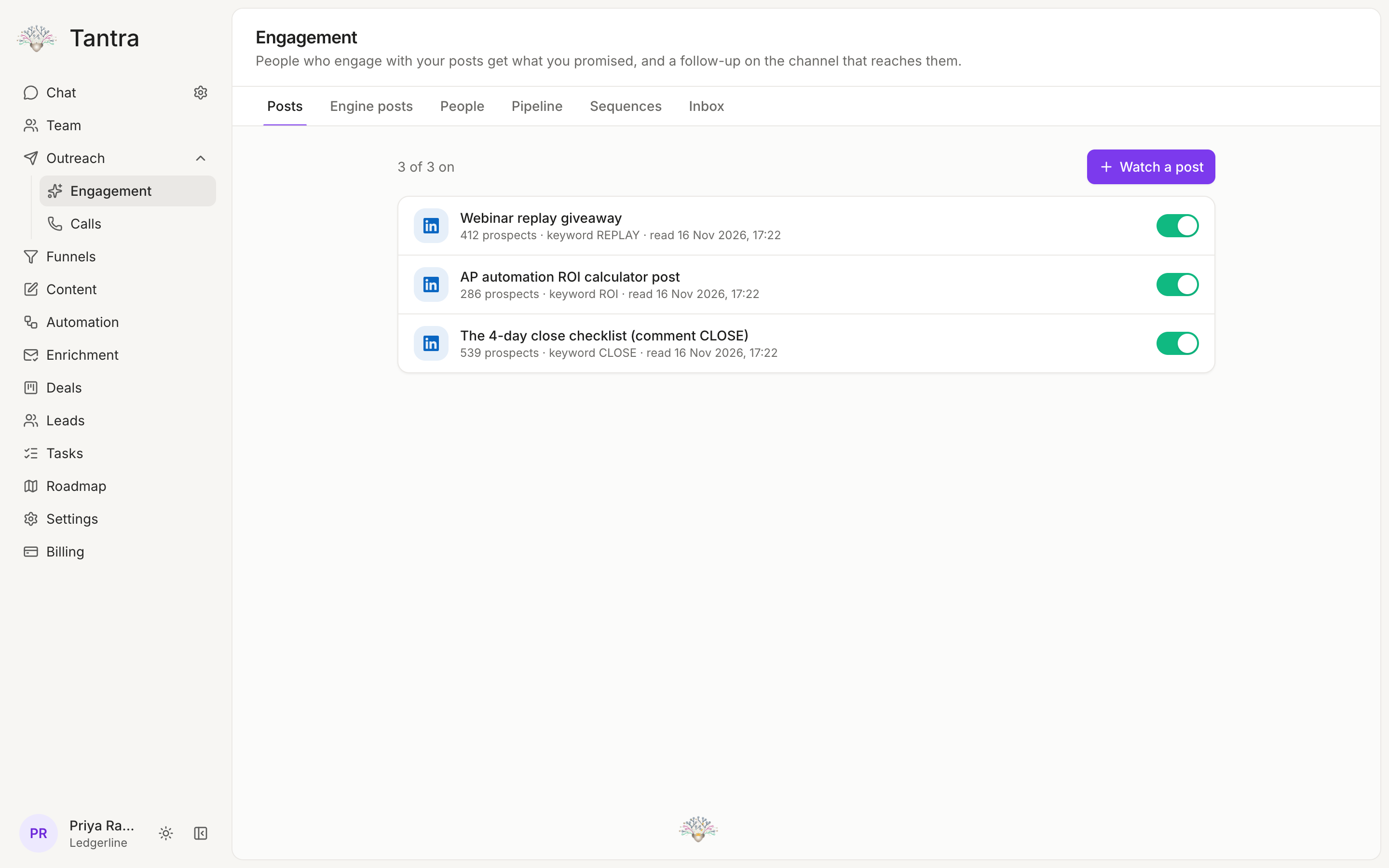
- In Engagement, click Watch a post, paste the link, and under Who gets a follow-up tick Giveaway keyword, Commenters, Likers and Sharers.
- Add the Resource (your checklist), the Public reply, the Invite note and the DM.
- It starts in Test mode. Click Preview sends, then Approve and start.
- Work people in Engagement › People. Send good fits to sales with Leads into sales (Copy or Move).
- Paste engager profiles into Enrichment › New list for verified emails, then Export CSV or enroll them.
See it: the Ledgerline example
Comment CLOSE and I'll send you the checklist they use.
Grace KimCFO, Atlas Clinics186 reacted, 143 commented enriched 171
| Person | Did | Company | Fit | Next |
|---|---|---|---|---|
| Grace KimCFO | Commented CLOSE | Atlas Clinics · 240 | 91 | Sent to Marcus |
| Leo NovakController | Liked | Harbor & Co · 85 | 84 | DM queued |
| Sara HaddadRecruiter | Liked | TalentWorks · 12 | 18 | Skip |
| Ian BrooksVP Finance | Reposted | Kiln Software · 60 | 79 | Connect + DM |
Send a monthly update, even with zero investors
Bad months are easy to hide when nobody asks. And your best connectors forget you exist.
The play
- Pick your insiders: investors, founding partners, advisors, friendly operators. A few hundred people is plenty.
- Same template every month: TL;DR numbers, primary updates (revenue, product, other), asks, product updates, wins and shoutouts, failures and learnings.
- Make one clear ask: intros, hires, customers or fundraising.
- It forces accountability and keeps you top of mind with the people most able to help.
A fixed monthly deadline makes you face the numbers, name what failed and write down your priorities. Sending it to the people best placed to help keeps you top of mind, and one specific ask turns goodwill into intros, hires and customers.
Do it in Tantra
- Tag your insiders (investors, founding partners, advisors) so they form one list.
- Pull the numbers from your funnel's dashboard and Revenue › Overview.
- Write the update in Outreach › Email campaigns with the same sections every month. Send on the first business day.
- Replies land in the inbox. Turn each answer to your ask into a deal in Deals on an "Intros" pipeline.
- Proposed: an update template prefilled with your funnel and billing numbers.
See it: the Ledgerline example
Revenue: best month yet, 4 founding partners converted to paid.
Product: multi entity consolidation shipped, used by 31 teams in week one.
Failures and learnings Our NetSuite sync broke twice. We now test every sync nightly against a copy of a real ledger.
What the Launch funnel type needs
Modules marked in Tantra exist today. Click paths use the app's own labels. Modules marked to build are new.